
A patch can be large enough to cover a glucose sensor and still be the wrong choice for it. CGM overpatch compatibility depends on the exact sensor model, the areas that must remain uncovered, the tape arrangement and the instructions for removal. Size alone does not settle those questions.
For a distributor building a range, "universal" is a useful starting description, but an incomplete purchasing specification. Wearers still need to check the instructions supplied with the sensor and the accessory.
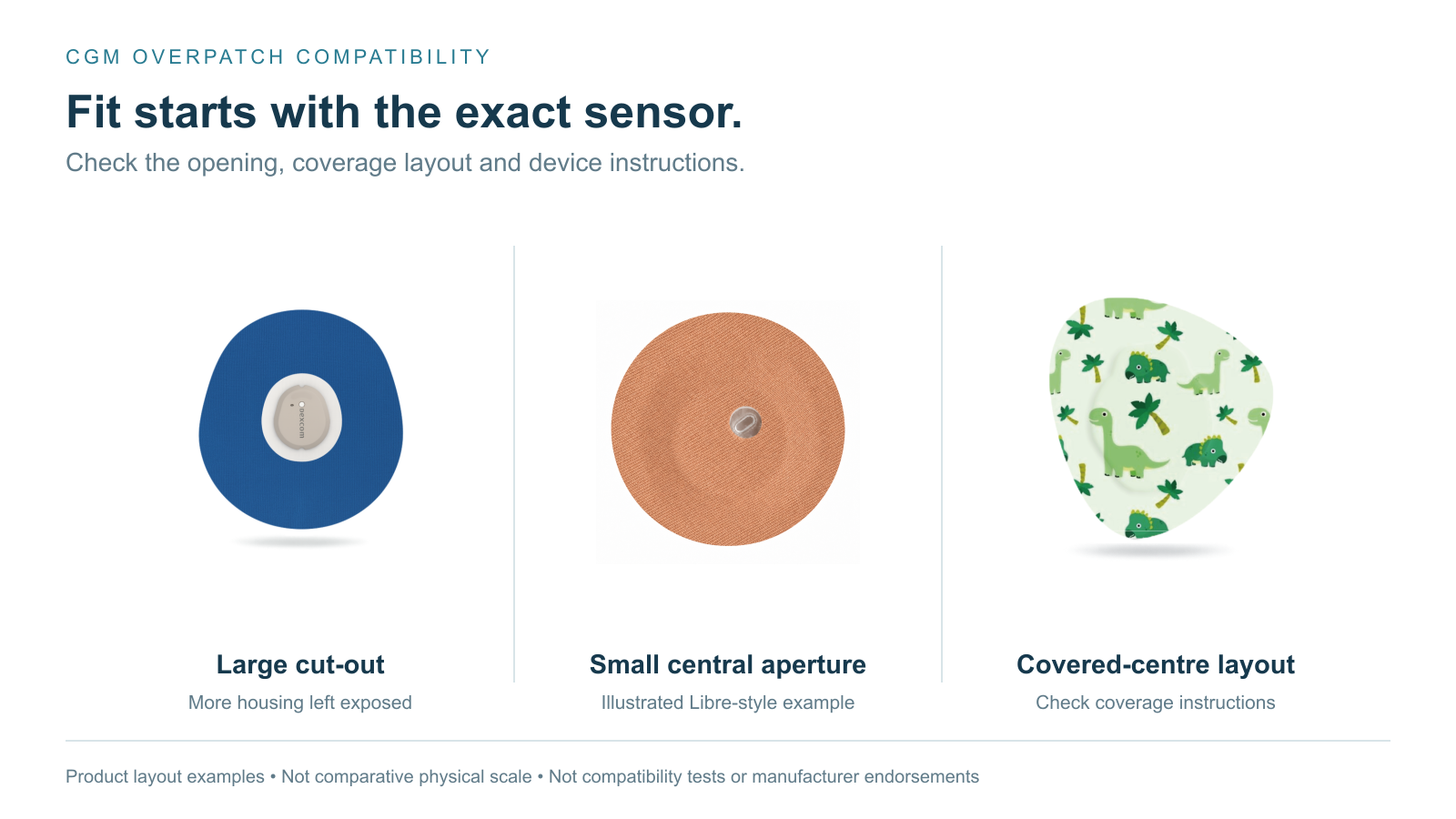
Two existing LINKFAR product artworks and an AI-assisted small-aperture illustration in LINKFAR's material style show different coverage layouts. The images are not shown at comparative physical scale and do not establish compatibility or manufacturer endorsement.
Are CGM overpatches universal?
A CGM overpatch may suit several sensors, but that does not make it suitable for every model. Check the device generation, required openings, coverage arrangement and removal instructions. A large cut-out, a small central aperture and a covered adhesive-free centre are different layouts and should not be treated as interchangeable.
This article focuses on those device-specific checks. For the wider choice of materials and accessories, see our guides to CGM patch materials, adhesives and quality and CGM and insulin pump accessories.
Abbott: why the central opening must stay uncovered
Abbott's Irish FAQ says a covering over FreeStyle Libre 3 Plus must leave the central opening uncovered so the sensor can breathe. Apply it at sensor placement and remove it only when sensor wear ends; peeling it off may loosen the sensor. Abbott Libre 3 Plus FAQ.
That supports a clear selection rule for the model and market described: a covering must preserve the required opening. It does not support saying that the hole is a wireless communication window, or that every covered-centre patch necessarily causes signal failure.
Abbott also publishes a US application and adhesion guide covering Libre 2 and Libre 3. Its page-three footnote says that the central opening must not be covered. A separate footnote discusses phone antenna position and scanning; it does not identify communication as the reason for keeping the hole open. The separate statements do not establish that connection. Abbott US application and adhesion guide, page 3.
Follow the opening requirement even when the manufacturer has not published a detailed engineering explanation. A guess about radio signals should not replace the stated instruction.
Dexcom, Medtronic and SIBIONICS do not all use the same approach
Manufacturer instructions differ both between brands and between models from the same brand. The following examples were checked on 25 October 2026. They describe the named sources and markets, not a worldwide rule or a list of sensors verified with LINKFAR products.
| Sensor and source market | What the official source says | What this means when selecting a patch |
|---|---|---|
| FreeStyle Libre 3 Plus, Ireland | Keep the central opening uncovered; follow the specified application and removal timing. | Check the position of any small aperture. The FAQ does not specify a third-party patch hole size or require the entire housing to be exposed. Abbott FAQ. |
| FreeStyle Libre 2 and Libre 3, US guide | The central sensor opening must not be covered. | Check the actual cut-out and its alignment, not just the outside diameter. Abbott guide, page 3. |
| Dexcom G6, Canadian professional FAQ | Supplemental tape can be cut to fit around the transmitter, or applied as a frame. | The suggested arrangement matters. This source does not explain the opening as a communication requirement. Dexcom G6 FAQ. |
| Dexcom G7 and G7 15 Day, US guidance | Dexcom provides a dedicated overpatch application section for these systems. | Use the corresponding instructions rather than carrying a G6 taping method over to G7. Dexcom G7 guidance. |
| Guardian 4, US support | Oval Tape is required. Two pieces secure the sensor base and transmitter; the transmitter is covered in the specified arrangement. | "Never cover any CGM transmitter" is not a valid general rule. An accessory is not automatically a substitute for the required tape. Guardian 4 support. |
| Simplera Sync, US support | Extra tape is usually unnecessary; additional support may be considered for very active use or hot, humid conditions. | Even within the same manufacturer's range, the fixation approach differs. An optional extra patch is not the same as required system tape. Simplera Sync support. |
| Instinct, Ireland | Extra tape is optional. If used, leave the sensor centre uncovered to avoid moisture build-up under the adhesive; do not remove the tape before sensor removal. | This source explicitly connects the opening with moisture management, not wireless communication. Instinct FAQ. |
| SIBIONICS GS1, international store FAQ | An overpatch is advised rather than mandatory. The FAQ permits removal or replacement during GS1 wear. | Do not transfer one model's replacement instructions to another sensor, or extend this GS1 answer to other generations. SIBIONICS FAQ. |
These instructions do not support a universal rule for changing an overpatch halfway through sensor wear. Follow the current local instructions for the exact device. If an accessory's directions conflict with them, resolve the conflict with the relevant manufacturer before using that combination.
A hole, an adhesive-free centre and breathable material are not the same
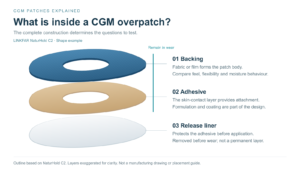
A physical opening can be a large cut-out around the sensor housing or a much smaller central aperture. Both remove material at the opening. An adhesive-free centre leaves material in place but omits adhesive from that area. A fully adhesive covering places both backing and adhesive across the covered region.
Those differences can be easy to miss in a product photograph. A transparent patch still has material across its centre unless it has an actual opening. A printed patch may hide whether the centre is open, uncoated or adhesive-coated.
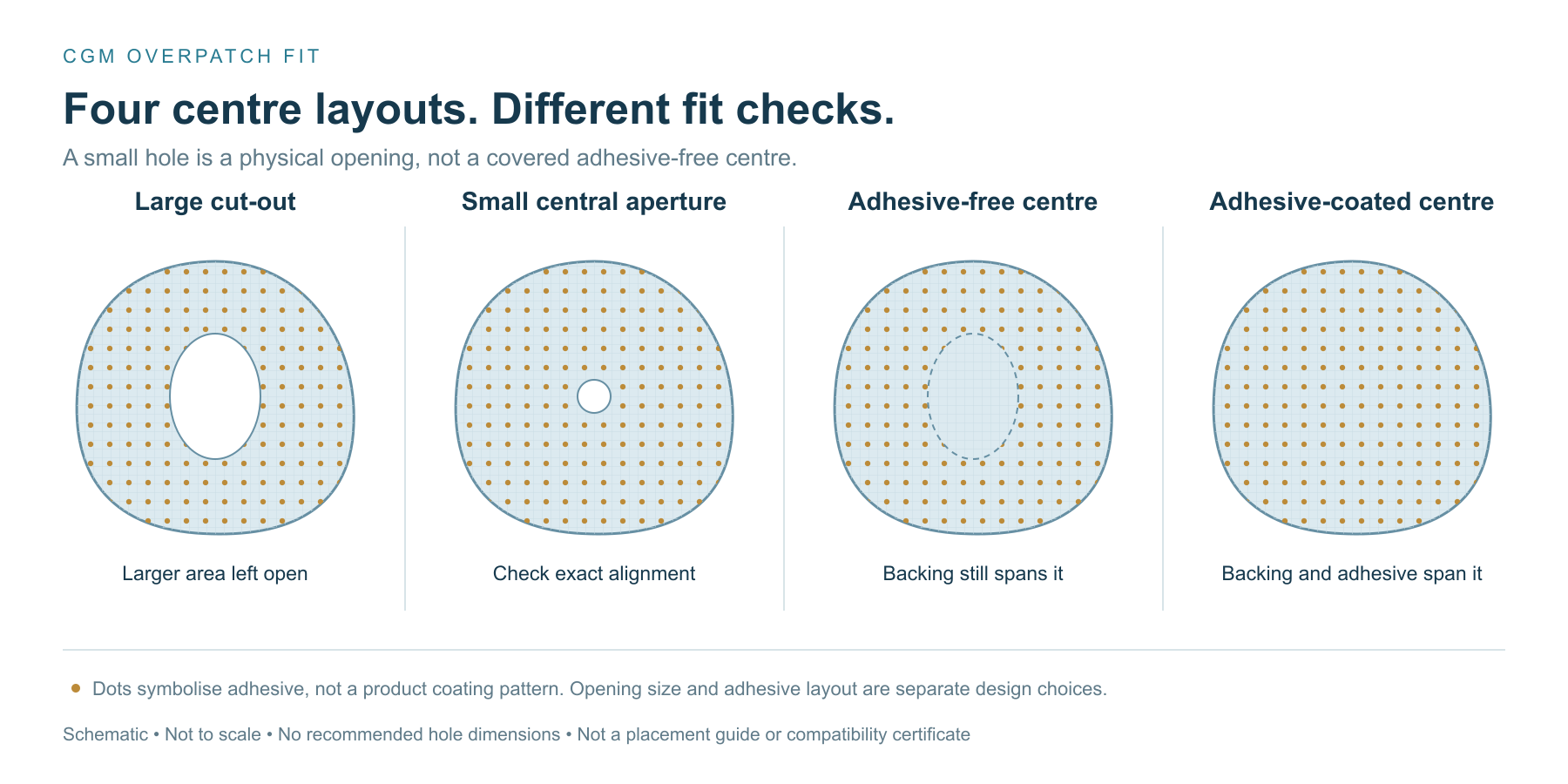
Construction schematic, not a device placement guide. The four examples separate opening size from adhesive placement; these features can also be combined in other designs. Hole sizes are illustrative, not recommended dimensions.
A small central aperture is another open design
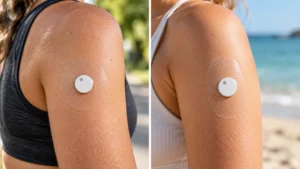
For Libre-style applications, there is another layout to consider: a patch that covers more of the sensor housing while leaving a small central aperture. The supplied example below shows this form. It differs from a large open-centre patch, which leaves much more of the housing exposed.
Abbott's Libre 3 Plus FAQ says to keep the sensor's central opening uncovered; it does not say the entire housing must remain exposed or prescribe a hole size for third-party patches. For a small-aperture design, the relevant check is whether that opening stays clear in the final worn position. This is a design consideration, not an endorsement of the pictured patch. Abbott Libre 3 Plus FAQ.
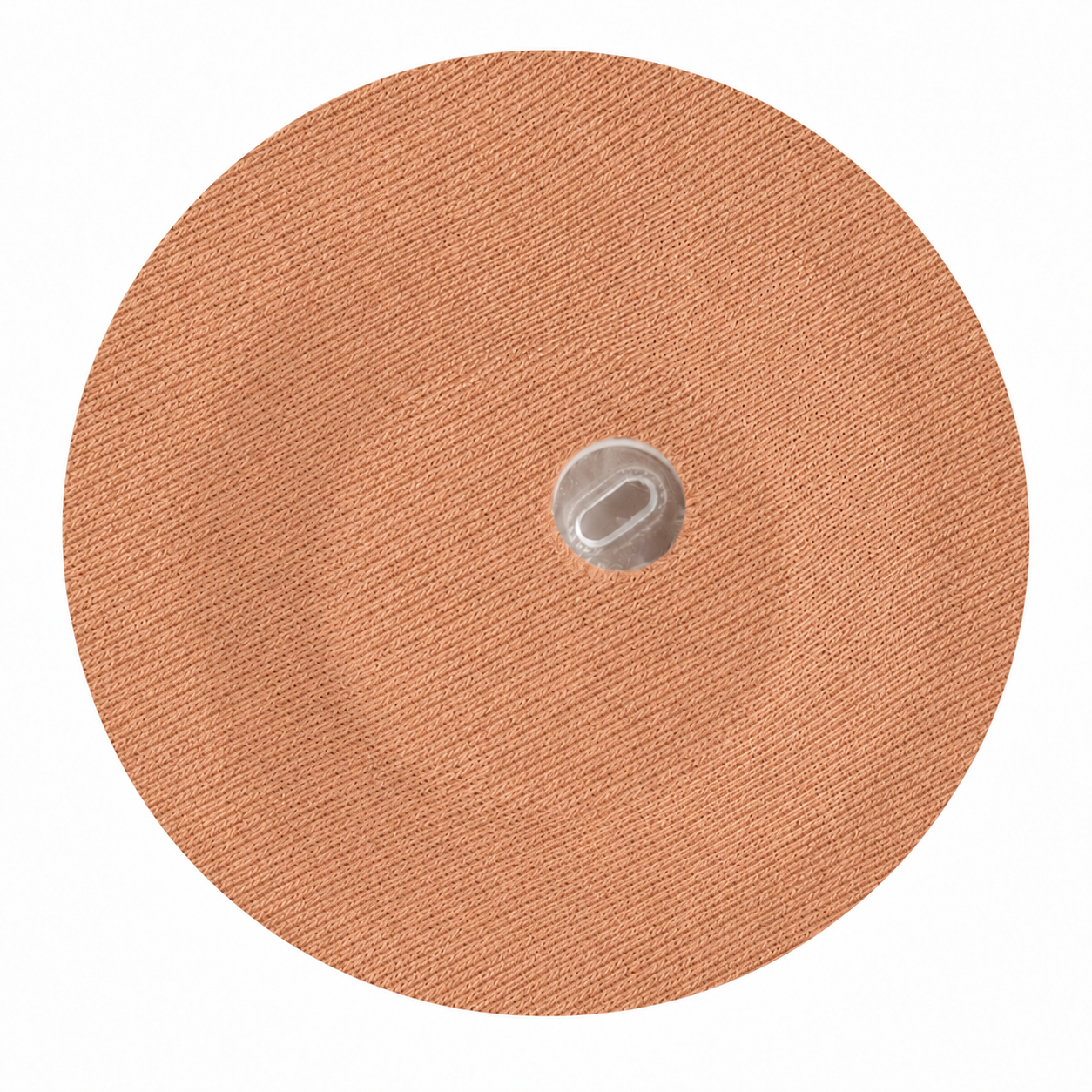
AI-assisted product illustration using the supplied small-aperture layout, LINKFAR's textile reference and a skin-tone colour reference; not a product photograph. It does not establish the exact sensor generation, patch reference, opening dimensions or validated compatibility.
A small aperture is not the same as a solid dot or an adhesive-free centre covered by fabric. Check the opening itself and its alignment with the exact sensor, rather than assuming that a small circle visible in a photograph is sufficient. Small-hole and large-cut-out designs are not automatically interchangeable across Libre generations.
A material's ability to pass water vapour also does not turn it into a physical opening. Where a sensor manufacturer specifies an uncovered area, a general "breathable" claim alone does not show that a covered design meets the requirement. Our P2/P3 PU-film article discusses material and finished-patch moisture behaviour separately from device-specific fit.
Nor does an open centre prove that a patch will interfere with communication less, last longer or be more comfortable. Those are separate questions requiring their own evidence. The opening must first match the named device's instructions.
What to check before buying a CGM sensor patch
Purchasing teams can use the following questions to build a compatibility record. Wearers should also check the exact model, but follow the device's own application instructions rather than treating this list as a clinical procedure.
- Which exact device is involved? Record the manufacturer, full sensor model and generation, and the country of use. A brand name or a photograph alone may not identify the applicable instructions.
- What fixation does the device require? Distinguish supplied or required system tape from an optional third-party overpatch. Do not assume that an accessory replaces a required component.
- What must stay uncovered? Check the position of the relevant opening and the final worn configuration after temporary handling supports have been removed as directed. For a small central aperture, confirm alignment and clearance rather than just the presence of a hole. A liner drawing is not enough.
- How does the patch sit around the device? Compare the outside contour, cut-out and adhesive layout on the exact device. During sample evaluation, check for folding, bridging or pulling on the device and its original adhesive pad.
- What happens at removal? Establish whether the patch stays until sensor removal and whether the manufacturer permits replacement during wear. A no-glue centre is not, by itself, permission to change a patch over an active sensor.
- What evidence supports the claim? Keep the accessory reference, device version, instructions reviewed and evaluation conditions together. Separate a visual fit check from evidence about wear time, skin tolerance or device function.
The resulting record gives a distributor a traceable basis for describing which product is intended for which device, including its limits. A list of brand logos cannot provide that detail.
How LINKFAR approaches the choice
LINKFAR's CGM accessory range includes different materials and coverage layouts. The NaturHold product page lists individual references rather than a single undifferentiated patch. Buyers should confirm the current reference and device version when requesting a sample.
Our view is that a product recommendation should start with that specific combination. Identify the required coverage geometry before choosing material, colour and retail packaging. For a private-label brief, approve the device-specific design and the proposed claim before treating the artwork as ready for production.
The company artworks in this article show why coverage layout deserves attention. They are not a compatibility certificate, and citing a sensor manufacturer's instructions does not mean that manufacturer has tested or endorsed a LINKFAR accessory.
Before calling a patch "universal"
A buyer can ask a supplier one concise question: "Which exact sensor versions is this patch intended for, and what evidence supports the coverage and use instructions?"
The answer should identify the accessory reference and its limits. If one design is proposed for several sensors, each device combination needs a documented basis; a similar diameter or an adhesive-free centre does not settle the matter.
For a LINKFAR product discussion, send us the exact sensor model, country of use and intended activity conditions. We can review the current product reference and sample requirements against that brief. Compatibility, wear duration and any proposed performance claim need confirmation for the specific combination.
This article is product-selection information, not a replacement for the device or accessory instructions or individual medical advice. Manufacturer names identify the systems discussed and do not imply affiliation or endorsement. Source instructions may change; check the current local version before use.
Related guides
-
 CGM and Insulin Pump Accessories: A Guide to Patches, Skin Care and Secure Wear
A sensor that starts lifting after exercise and a patch that hurts to remove create different problems. Buying a stronger adhesive may help with…
CGM and Insulin Pump Accessories: A Guide to Patches, Skin Care and Secure Wear
A sensor that starts lifting after exercise and a patch that hurts to remove create different problems. Buying a stronger adhesive may help with…
-
 CGM patches explained: materials, adhesives and quality
Two CGM patches can have the same outline and feel quite different after a day of wear. One may feel more like fabric; another…
CGM patches explained: materials, adhesives and quality
Two CGM patches can have the same outline and feel quite different after a day of wear. One may feel more like fabric; another…
-
 Waterproof and breathable CGM overpatches: the P2/P3 design
A CGM patch can still be attached after a swim while the skin underneath feels damp. Those are two different results, and checking only…
Waterproof and breathable CGM overpatches: the P2/P3 design
A CGM patch can still be attached after a swim while the skin underneath feels damp. Those are two different results, and checking only…
-
 CGM Skin Barrier Wipes: Balancing Protection and Hold
By David Zhou · LINKFAR Healthcare GmbH Recently, a customer in Central America told us that his CGM came off during a football match…
CGM Skin Barrier Wipes: Balancing Protection and Hold
By David Zhou · LINKFAR Healthcare GmbH Recently, a customer in Central America told us that his CGM came off during a football match…